
Build a training container
The contract and procedure for running your usual training Docker image in the platform's training wizard.
Required permission: DevelopDEVELOPER · OPERATOR · ADMIN
Build the training Docker image the way you always do. You add no platform script to the image and follow no special output format.
This section covers the training image's outer contract and how to verify it. It does not cover the model algorithm.
Summary
| Item | Details |
|---|---|
| Deliverable | An image tar made with docker save (+ tag name · sha256) |
| Execution | The platform runs the image's ENTRYPOINT as is. It does not override the command |
| Input | The platform downloads the training data beforehand and places it in /geo/dataset. You need no download code and no storage credentials |
| Settings | Hyperparameters, task and GPU all come in as environment variables |
| Output | Upload everything you want to keep to MLflow. The container file system disappears when the run ends |
| Exit | exit 0 = success, anything else = failure |
The flow of one training run
One training run executes as one Kubernetes Job (one pod). The platform does ①–③ and ⑧–⑩; the container is involved only in ④–⑦.
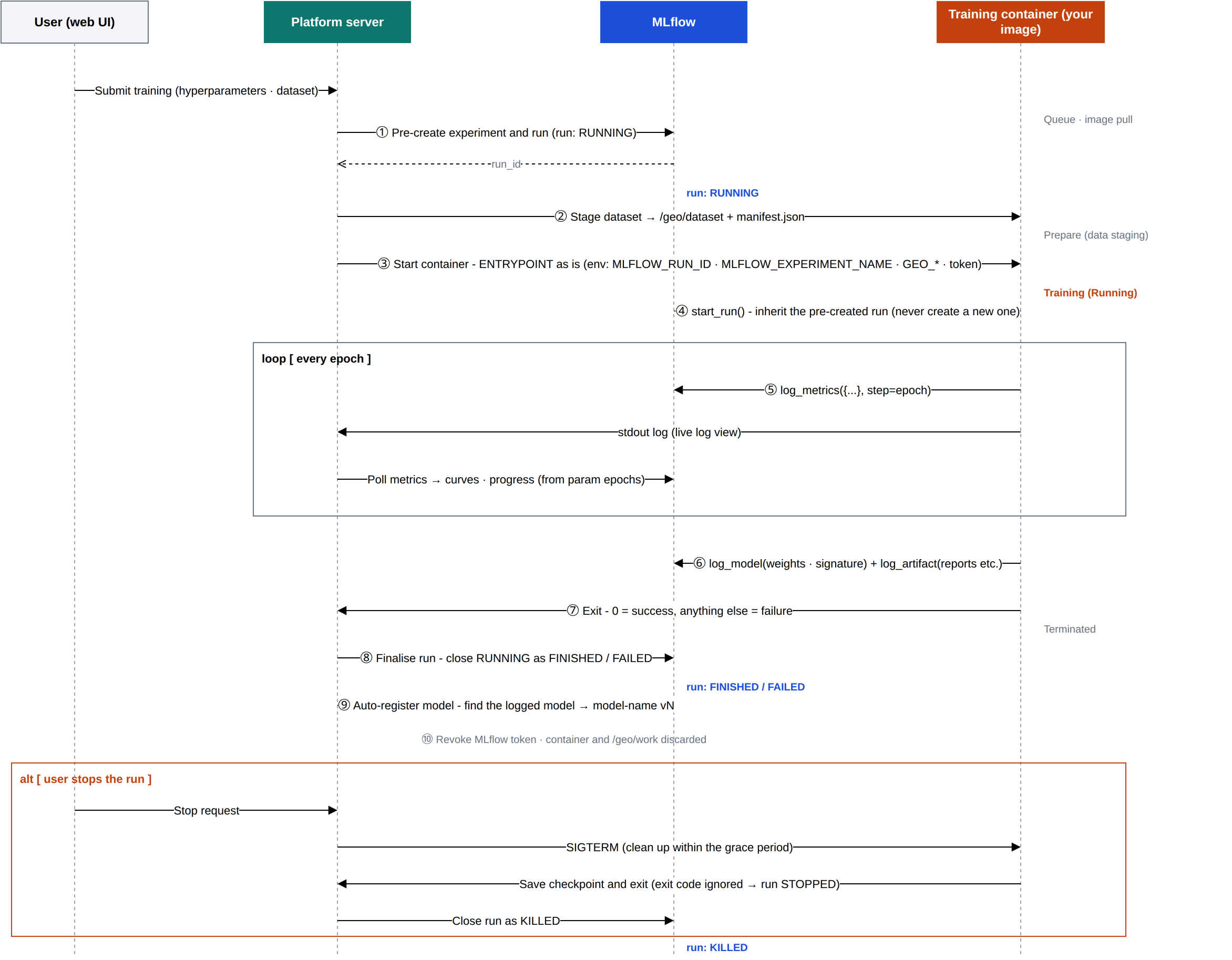
- The MLflow run already exists before the training container starts (①). The platform creates it when the run leaves the queue and starts preparing. The container's
mlflow.start_run()takes over that run (④). Even if the container dies without closing the run, the platform settles the final state from the exit code (⑧). - Logs and metrics take different paths. Standard output flows only to the live log on screen; the platform reads curves and progress from MLflow (⑤). Numbers you
printdo not become curves. - Data preparation finishes before your training code starts (②). The pod's init container fetches the dataset and places it in
/geo/dataset, and only then does your image start.
The six steps the server shows
The Progress steps (진행 단계) on the training detail screen are fixed at six. They move only on facts the platform observes. The trainer does not report steps (and has no way to).
| # | Step key | Screen name | What happens in the step |
|---|---|---|---|
| 1 | queue | Queued (실행 대기) | From submission until a run slot is free |
| 2 | runtime_prepare | Prepare training environment (학습 환경 준비) | Issuing the run token and image pull credentials, creating the Job, scheduling the pod and pulling the image |
| 3 | data_stage | Prepare dataset (데이터셋 준비) | While the init container places the dataset. No progress is shown; it completes when the training container starts |
| 4 | train | Training (학습) | Your ENTRYPOINT. Progress = MLflow's max(step)+1 / params.epochs |
| 5 | register | Register in model registry (모델 레지스트리 등록) | If registration was turned on in the review step, registering the logged model as a new version in the registry |
| 6 | finalize | Finalize results (결과 정리) | Closing out the state, revoking the run token |
Order of this section

- Three things a trainer does — metrics, model logging, exit code
- Paths and environment variables inside the container
- The full MNIST example — a complete set you copy and swap in your training code
- Verify locally first
- Upload the image to the platform — tar import or
docker push - Make it selectable in the wizard — external-image variant
- Catalog registration — new frameworks, models and hyperparameters through an image label or the admin screen
- Built-in training runtimes — YOLO · RF-DETR · Pointcept
- Pretrained weights
- Common failures