
Components
One app holds the API, MLflow and the registry; the rest is the database, storage, monitoring and build caches
Users work with one app (port 10000), which contains the API, MLflow and the container registry. The rest are places that hold data (Postgres, RustFS), places that watch (Prometheus, Alertmanager), and caches that speed up builds. The web UI is a bundle of static files deployed separately from the app; the browser calls this app's API.
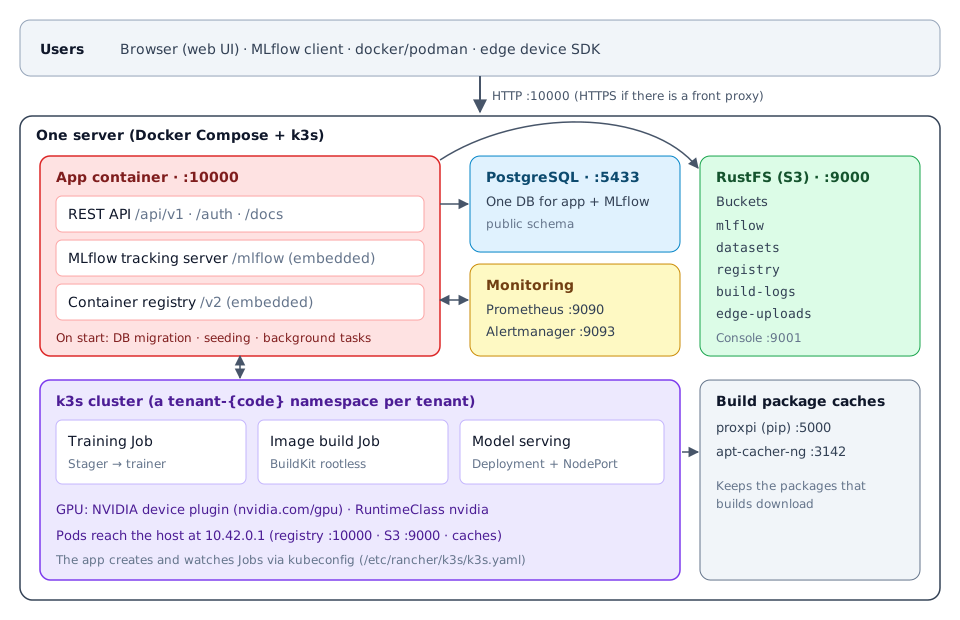
App (port 10000)
The app service in docker-compose.yml. It runs on the host network (network_mode: host), so it reaches Postgres, RustFS and Prometheus on localhost and the k3s API without any configuration.
| Path | What |
|---|---|
/api/v1/…, /auth/… | The REST API used by the web UI and the CLI. API docs are at /docs |
/mlflow | Embedded MLflow tracking server. Point the MLflow Python client at <address>/mlflow and it works as is. You do not run a separate MLflow server |
/v2 | Embedded OCI container registry. A registry that supports docker push/pull; training, build and serving images are stored here. No separate registry container is needed |
Every time the app starts, it runs the following.
- DB schema migration (
alembic upgrade head) —start-uvicorn.shruns it before starting the server - Seeding — creates the bootstrap administrator account and the entries for the shared build images (leaves them alone if they already exist)
- Prepares each tenant's MLflow workspace and cleans up work cut off by a restart (image imports, upload assembly and so on)
- Starts background tasks — the training queue, the build watcher, serving heartbeats, edge fleet checks
PostgreSQL (port 5433)
The app and MLflow use the same database and the same public schema. One dump backs up both.
RustFS (port 9000, console 9001)
An S3-compatible object store. Buckets are split by purpose.
| Bucket | Holds |
|---|---|
mlflow | MLflow artifacts (model files and so on), the pretrained weights mirror |
datasets | Dataset files |
registry | Container image layers and manifests (split by tenant) |
build-logs | Image build logs |
edge-uploads | Files that edge devices collected while offline and uploaded later |
Compose's createbucket creates mlflow, datasets and registry at the start; the app creates build-logs and edge-uploads the first time it uses them.
Prometheus (9090) · Alertmanager (9093)
Prometheus scrapes the app's /api/v1/metrics and evaluates the alert rules. When an alert fires, Alertmanager sends it back to the app's webhook and it appears on the app's Alerts (경보) screen. The app's system console shows the web UIs of both tools (Prometheus (Prometheus), Alertmanager (Alertmanager)), so users never need to open 9090 or 9093 directly.
k3s cluster
Training, image builds and model serving all run as k3s pods. Each tenant gets its own tenant-{code} namespace.
- Training — one Kubernetes Job. The stager (an init container) puts the dataset in place and the training runtime image trains.
- Image builds — a BuildKit rootless Job. It builds the training runtime, stager, serving builder and model serving images and pushes them to the app's registry. It uses neither the host's Docker daemon nor root privileges.
- Model serving — a plain Deployment + NodePort. Inference requests always go through the app.
Build package caches (5000 · 3142)
proxpi (pip) and apt-cacher-ng (apt). They keep the packages that builds download from the internet, so builds are faster from the second one on. Without any configuration, the app connects to them at http://10.42.0.1:5000/index/ and http://10.42.0.1:3142. If your environment does not run these two, you must turn off cache use — see Air-gapped installation.
In addition, builds cache image layers in the {tenant}/cache repository of the app's registry (on by default).